컴퓨터의 시간측정
개요
코드의 성능 측정을 위해 시작 끝 지점의 시간을 구해서 사용하거나, n초 후에 어떤 로직을 실행해야 하는 등 코드를 만들 때 시간을 측정해야 하는 경우가 있다.
이 때 시간을 어떻게 받아오는 지에 대해 생각해보자.
시간을 구하는 법
소프트웨어는 하드웨어 없이 단독으로 시간을 알 수 없다.
CPU가 명령어를 실행하는 흐름만 있을 뿐 n초가 지났는지 알 수 있는 방법은 없다.
따라서 소프트웨어는 하드웨어를 통해서 시간을 받아와야 한다.
하드웨어의 시간 계산
PIT->HPET->LAPIC 순으로 발전하면서
https://en.wikipedia.org/wiki/Programmable_interval_timer
Programmable interval timer - Wikipedia
From Wikipedia, the free encyclopedia Counter that generates an output signal when it reaches a programmed count In computing and in embedded systems, a programmable interval timer (PIT) is a counter that generates an output signal when it reaches a progra
en.wikipedia.org
https://en.wikipedia.org/wiki/High_Precision_Event_Timer
High Precision Event Timer - Wikipedia
From Wikipedia, the free encyclopedia Hardware timer used in personal computers The High Precision Event Timer (HPET) is a hardware timer available in modern x86-compatible personal computers. Compared to older types of timers available in the x86 architec
en.wikipedia.org
https://en.wikipedia.org/wiki/Advanced_Programmable_Interrupt_Controller
Advanced Programmable Interrupt Controller - Wikipedia
From Wikipedia, the free encyclopedia Family of computer interrupt controllers In computing, Intel's Advanced Programmable Interrupt Controller (APIC) is a family of programmable interrupt controllers. As its name suggests, the APIC is more advanced than I
en.wikipedia.org
하드웨어 인터럽트를 통해 시간을 정교하게 계산할 수 있게 되었다.
추가적으로 더욱 정밀한 계산에는 TSC(Time Stamp Counter) 를 사용하기도 한다.
https://en.wikipedia.org/wiki/Time_Stamp_Counter
Time Stamp Counter - Wikipedia
From Wikipedia, the free encyclopedia 64-bit x86 register A Linux boot log showing the usage of TSC as system clocksource The Time Stamp Counter (TSC) is a 64-bit register present on all x86 processors since the Pentium. It counts the number of CPU cycles
en.wikipedia.org
각각이 어떤 기능인지는 링크를 통해서 확인해보자.
시간 해상도
시간을 계산하는 함수는 각각 시간 해상도가 다를 수 있다.
시간 해상도는 측정 가능한 가장 작은 시간 단위를 말한다.
GetTickCount()같은 레거시 함수는 약 15.6ms(64hz) 시간마다 갱신되는 커널 tick을 받아온다.
timeGetTime()은 Windows 커널의 멀티미디어 타이머 서브시스템을 통해 시스템 타이머 인터럽트 주기에 기반해서 값을 받아온다. (아래의 current timer interval)
timeBeginPeriod(uPeriod)를 통해서 uPeriod를 time interval로 설정할 수 있다.
timeEndPeriod(uPeriod)를 사용하면 timeBeginPeriod를 사용해 설정한 uPeriod를 복구할 수 있다.
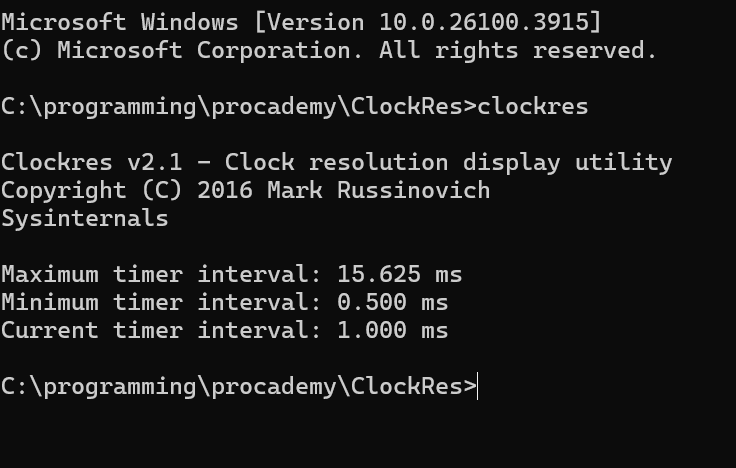
64hz정도면 작은 수치라고 생각할 수 있지만, 시스템 타이머 인터럽트 주기를 통해서 스레드 스케쥴링 등의 작업을 하기 때문에 정밀한 제어를 위해서 timeBeginPeriod를 설정하는 것은 시스템 설계에 따라서 매우 중요할 수 있다.
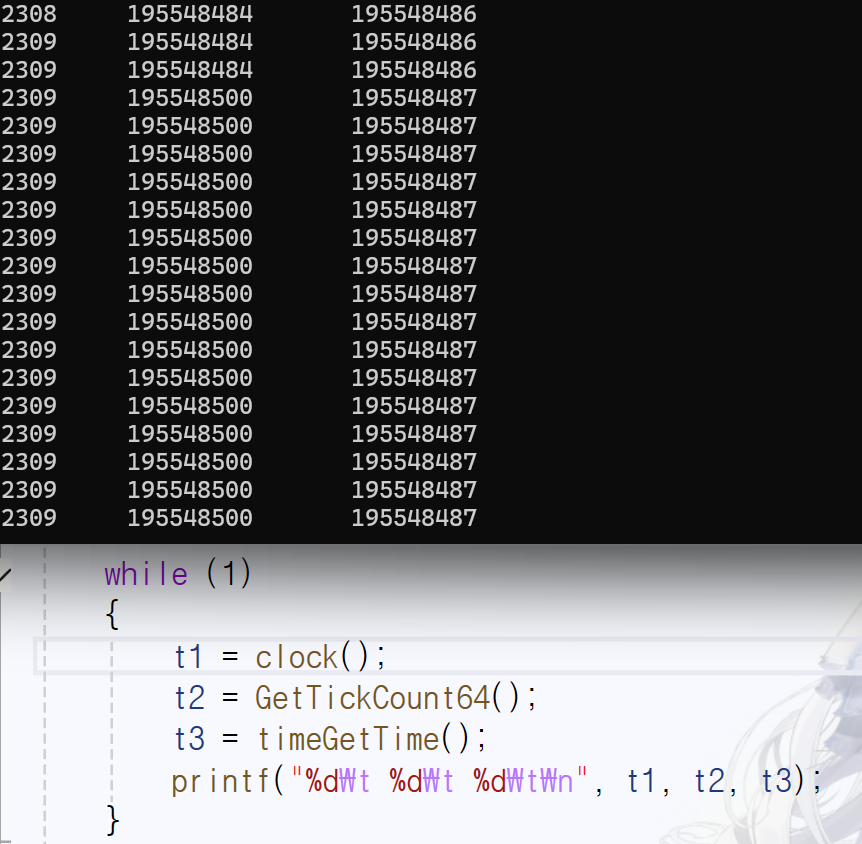
GetTickCount는 갱신 주기가 16ms 이지만, timeGetTime은 1ms가 갱신주기인 것을 확인할 수 있다.
GetTickCount의 경우 기본 반환값이 DWORD인데, 컴퓨터가 켜진 뒤 49.7일이 지나게 된다면 DWORD 범위를 넘어서기 때문에 ULONGLONG을 반환값으로 사용하는 GetTickCount64를 권장한다.
고해상도 타임스탬프
고해상도 타임스탬프 획득 - Win32 apps
Windows는 고해상도 타임스탬프를 획득하거나 시간 간격을 측정하는 데 사용할 수 있는 API를 제공합니다.
learn.microsoft.com
TSC는 클럭주기로 값이 늘어나는 매우 정교한 타임스탬프 값이다. (3.7Ghz CPU는 1초에 3.7G씩 증가하는 값)
QPC(Query Performance Counter)를 사용하면 이 TSC 값을 활용할 수 있다.
CPU 클럭의 값은 항상 일정하지않고 들쭉날쭉하기 때문에 TSC값을 그대로 사용한다면 클럭의 수치에 따라 값이 상대적으로 빠르게 늘어날 때, 느리게 늘어날 때가 있을 것이다.
위와 같은 문제를 해결하기 위해 최신 CPU는 Invariant TSC값을 사용한다. 클럭 동작과 무관하게 고정된 값을 정하고 이를 통해서 TSC값을 늘어나게 하는 것이다. CPU가 절전상태이든, 오버클락 상태이든 일정하게 증가한다.
그 외에 다른 함수들은 또 나중에 도 봐야겟따 끝.